ORF OK News Portal – INFOTEXT
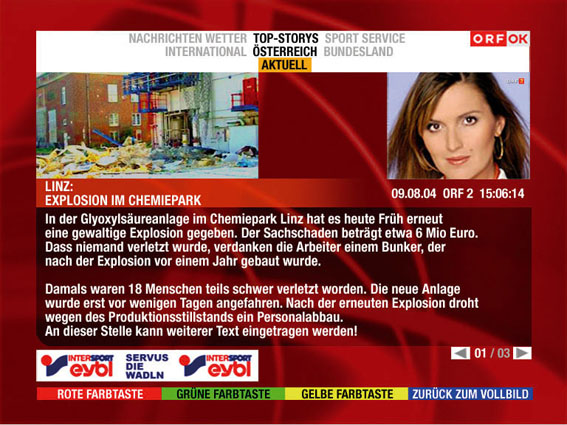
If a report spans more than one page in ORF‘s interactive content, the viewer can see the page number at the lower edge of the text box and use the arrow buttons to move from one page to the next. The picture and sound for the show currently on the air remain visible at all times. Once the users have finished reading the desired information, they need only press the blue button to return to the full-screen image.
For quick access to information, viewers can also use shortcuts. Within the portal, the colored buttons can be linked directly to a specific page, thus allowing viewers to access the information they need quickly and easily. This can also shorten the navigation paths required in the bars at the top of the screen.

If a report spans more than one page in ORF‘s interactive content, the viewer can see the page number at the lower edge of the text box and use the arrow buttons to move from one page to the next. The picture and sound for the show currently on the air remain visible at all times. Once the users have finished reading the desired information, they need only press the blue button to return to the full-screen image.
For quick access to information, viewers can also use shortcuts. Within the portal, the colored buttons can be linked directly to a specific page, thus allowing viewers to access the information they need quickly and easily. This can also shorten the navigation paths required in the bars at the top of the screen.